- Joined
- Jun 12, 2020
- Messages
- 18,947
You mean the gender of Roland's nemesis? He's a dude, a very pretty dude.
They have a male vc.
Hwang Chang-young

@Mangamoz quick browse from wiki doesn't really tell, is it up to interpertation?

You mean the gender of Roland's nemesis? He's a dude, a very pretty dude.
They have a male vc.
Hwang Chang-young
@Mangamoz quick browse from wiki doesn't really tell, is it up to interpertation?
Not now I'm tired from last night.fuck you





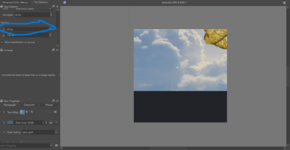
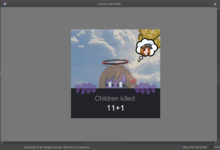

@bigtiddyoneesan @BakedBanana @ItsukimotoI mean yeah, but I haven't played LoR yet, so I don't want to larp the series more than I'm already doing

I am so thankful but I understood untill you started using "x"For @LYAISASIMP and others who for some reason want to copy @BakedBanana and I's pfp and banner combo:
Do note that I'm not perfect, and there might be some mistakes and things I get wrong in here, so take everything I say with a lick of salt.
First step, you're going to use one of these templates as a starting baseline for your pfp. Which one you choose depends on whether or not you've hid your online status to the general public, and/or if you have a role such as Contributor, Group Leader, et cetera.
Use this template made by me if you don't hide your online status or if you do but also have a role:
View attachment 57465
And use this template by @BakedBanana if you hide your online status and don't have a role:
Next step, you're going to want to make a profile banner that is 1474 pixels wide and 312 pixels tall. If you want to use a different resolution, you're going to have to crop and resize it down to those numbers. That is the standard resolution for profile banners in Xenforo. Don't ask me how I know this.
Example, my current profile banner:
View attachment 57468
Thirdly, you're going to open up an image editing software of your choice (e.g.: Krita, which is what I use) and open up one of those templates I posted earlier:
View attachment 57471
In your image editing software, import the banner you made, and resize it to 2457 x 520 pixels.
"But David, why can't I just paste the banner in? Why do I have to resize my banner?"
Because if you just paste the banner in, the banner will not align with your pfp. You'll see what I mean for yourself when you try that out.
"Then why couldn't I have just made a 2457 x 520 pixel banner in the first place?"
S-shut up. I haven't tested that yet.
Anyways, after you've pasted it in and resized the banner to that resolution, you have to change the x-coordinate of the position of your banner to -20 pixels.
Why? Because in Xenforo, your pfp is offset from your profile by approximately 10 pixels to the right.
View attachment 57474
After that, plop in the rest of the details, like your character, statistics, whatever, and you're done.
View attachment 57477

The x-axis usually corresponds to the left-right direction. Changing it by -20 pixels is like moving it 20 pixels to the left.I am so thankful but I understood untill you started using "x"
Thank you for telling me that. Now imma ask ai help make the whole guide sound simpler because I'm a dumboThe x-axis usually corresponds to the left-right direction. Changing it by -20 pixels is like moving it 20 pixels to the left.

If I was forced to be a Roland, I would rather be someone who at least experienced the source material first...
For @LYAISASIMP and others who for some reason want to copy @BakedBanana and I and @yogurtman250's pfp and banner combo:
Do note that I'm not perfect, and there might be some mistakes and things I get wrong in here, so take everything I say with a lick of salt.
First step, you're going to use one of these templates as a starting baseline for your pfp. Which one you choose depends on whether or not you've hid your online status to the general public, and/or if you have a role such as Contributor, Group Leader, et cetera.
Use this template made by me if you don't hide your online status or if you do but also have a role:
View attachment 57465
And use this template by @BakedBanana if you hide your online status and don't have a role:
Next step, you're going to want to make a profile banner that is 1474 pixels wide and 312 pixels tall. If you want to use a different resolution, you're going to have to crop and resize it down to those numbers. That is the standard resolution for profile banners in Xenforo. Don't ask me how I know this.
Example, my current profile banner:
View attachment 57468
Thirdly, you're going to open up an image editing software of your choice (e.g.: Krita, which is what I use) and open up one of those templates I posted earlier:
View attachment 57471
In your image editing software, import the banner you made, and resize it to 2457 x 520 pixels.
"But David, why can't I just paste the banner in and leave it like that? Why do I have to resize my banner?"
Because if you just paste the banner in, the banner will not align with your pfp. You'll see what I mean for yourself when you try that out.
"Then why couldn't I have just made a 2457 x 520 pixel banner in the first place?"
S-shut up. I haven't tested that yet.
Anyways, after you've pasted it in and resized the banner to that resolution, you have to change the x-coordinate of the position of your banner to -20 pixels.
Why? Because in Xenforo, your pfp is offset from your profile by approximately 10 pixels to the right.
View attachment 57474
After that, plop in the rest of the details, like your character, statistics, whatever, and you're done.
View attachment 57477


the twiglets girl? I think I could work with her! Though I know nothing of her except how cute she is.
Well, I am a man of my word.Be right back, I'm about to cook something up.

People will be so confused why is this uguuu piece of uguuu holding a fake png of Roland from entire different series with entirely different genre of a game.Well, I am a man of my word.
View attachment 57486
It's ok most of the people here don't know where either of them came from.People will be so confused why is this uguuu piece of uguuu holding a fake png of Roland from entire different series with entirely different genre of a game.

So you have full on dedicated yourself to carrying on @K.Angel 's pixmic legacy huh.Good morning, CCT! Have a great week! (Sorry for the delay. I had to take my dog for a walk)
A rival has arrived(I want to catch up to GYP so gotta shit and post a bit more!)
Dunno. Maybe they're the type to take long breaks from the forums 🤔Did she ever come back from her exams? They should be long over by now.
Oh wait, I remember now.Dunno. Maybe they're the type to take long breaks from the forums 🤔
That sounds familiar...Oh wait, I remember now.
She said over on her @Ame_RainCandy profile that she DID flunk her exams, and will repeat grades.
Perhaps her parents threw her phone/and or pc out the window as punishment for failing?

She had issues listening in class and got sent to the summer concentration camp, where she'll be until she takes studying seriously & can pass her exams.punishment for failing?