Image on comments

Solution
How to insert img on comments without using external link
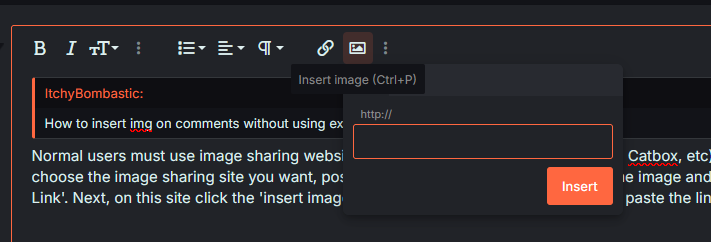
Normal users must use image sharing websites to post images on the site (ie Imgur, Catbox, etc). So after you choose the image sharing site you want, post the image there and then right click the image and click 'Copy Image Link'. Next, on this site, click the 'Insert image' button (CTRL+P for the shortcut) and paste the link and then viola.
mwzhtn.png


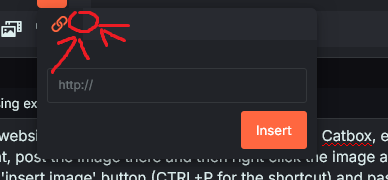
But if you want to insert images directly onto here without using those image sharing websites you must have the role above regular member, so roles like Group Leader, Contributer, Supporter, VIP, etc. If you have any of those roles you will get another button to directly insert...
Yuri lover in denial
Contributor
Joined
Nov 18, 2018
Messages
19,799
How to insert img on comments without using external link
Normal users must use image sharing websites to post images on the site (ie Imgur, Catbox, etc). So after you choose the image sharing site you want, post the image there and then right click the image and click 'Copy Image Link'. Next, on this site, click the 'Insert image' button (CTRL+P for the shortcut) and paste the link and then viola.
mwzhtn.png


But if you want to insert images directly onto here without using those image sharing websites you must have the role above regular member, so roles like Group Leader, Contributer, Supporter, VIP, etc. If you have any of those roles you will get another button to directly insert videos/images onto the site right beside the 'Insert image' button (I can't show you this since I'm also a normal user).
mdfqfx.png


https://forums.mangadex.org/threads/en-site-role-list-requirements-faq.1126410/
https://forums.mangadex.org/threads/en-how-to-get-roles-on-the-discord-server.2190321/
 
Solution
Dex-chan lover
Joined
Aug 27, 2020
Messages
167
Normal users must use image sharing websites to post images on the site (ie Imgur, Catbox, etc). So after you choose the image sharing site you want, post the image there and then right click the image and click 'Copy Image Link'. Next, on this site, click the 'Insert image' button (CTRL+P for the shortcut) and paste the link and then viola.
mwzhtn.png


But if you want to insert images directly onto here without using those image sharing websites you must have the role above regular member, so roles like Group Leader, Contributer, Supporter, VIP, etc. If you have any of those roles you will get another button to directly insert videos/images onto the site right beside the 'Insert image' button (I can't show you this since I'm also a normal user).
mdfqfx.png


https://forums.mangadex.org/threads/en-site-role-list-requirements-faq.1126410/
https://forums.mangadex.org/threads/en-how-to-get-roles-on-the-discord-server.2190321/
Thanks 😊
 
A degenerate pervert who loves vanilla
Supporter
Joined
Jan 19, 2018
Messages
5,139
God help you if youd had been here during v3 nowadays its super simple but back then if you didn't know the bbcode you were fucked :kek:
 

Users who are viewing this thread

Top