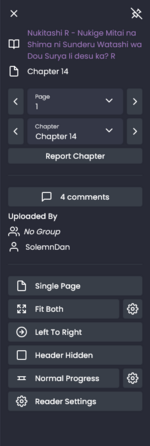
What setting gets rid of the header at the top of each chapter?

Dex-chan lover
Joined
Jul 9, 2018
Messages
226
This thing
ob0diR.png

I just cleared my cookies and now I can't figure out how to get my old behaviour back. That header wasn't there, and the menu was instead accessible from an arrow at the top right
Right now I'm only able to open the menu by scrolling all the way to the top
 
Solution
Header hidden + the pin on the top right of the reader menu.
Screenshot_20260618_193846.jpg
And since you had the button in the top right means you didn't have the option to hide it checked in the reader settings
Knight of Dex
Contributor
Joined
Mar 6, 2019
Messages
6,205
After entering the chapter it should automatically show only the manga page you're reading and same thing after you pass the pages (this happens even on default settings). There's a header option if you click on menu, the fourth:
0.png
(Random series clicked)
 
Dex-chan lover
Joined
Jul 9, 2018
Messages
226
That setting gets rid of the bar at the very top of the page, I'm talking about the thing from my screenshot. I'm pretty sure there used to be a way to hide that and pin the menu button to the top right of the page
 
Knight of Dex
Contributor
Joined
Mar 6, 2019
Messages
6,205
That setting gets rid of the bar at the very top of the page, I'm talking about the thing from my screenshot. I'm pretty sure there used to be a way to hide that and pin the menu button to the top right of the page
Do you still see that part if you scroll down? After you move to the following page, it stays in the same fixed place or it goes upwards?
 
Last edited:
File Attacher
Staff
Super Moderator
Joined
Jan 20, 2018
Messages
323
Header hidden + the pin on the top right of the reader menu.
Screenshot_20260618_193846.jpg
And since you had the button in the top right means you didn't have the option to hide it checked in the reader settings
 
Solution

Users who are viewing this thread

Top