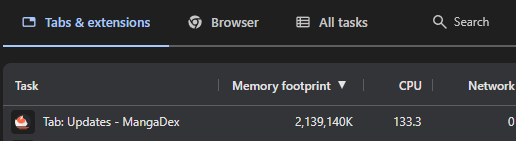
[Mainsite] Follows Updates 2+GB RAM usage on opening

Dex-chan lover
Joined
Jan 8, 2023
Messages
147
When you open Follows Updates, it is loading very slow, sometimes need to wait for 1-2 minutes for it to load and be clickable.
In Task Manager browser tab consume A LOT resources, much more that suppose to be.
TeqQKei.png


Reproduce:
1. Open Task Manager
2. Open Browser (Chrome)
3. Go to MangaDex Updates page while being logged in.
4. Watch numbers in Task Manager goes from 0 to 2GB RAM and 10% CPU with 8 cores 16 thread trying to open just a mere webpage for 1-2 minutes.

Specs:
  • Chrome Version 148.0.7778.179 (Official Build) (64-bit)
  • Windows 11 Pro 25H2, OS build 26200.8457
  • Network cable to router (no Wi-Fi ofc), optics from router to ISP
 
Dex-chan lover
Joined
Jan 11, 2023
Messages
1,606
Yeah... Just some casual javascript memory leak... Or maybe not?
Did you installed too many extensions?
If not then, this might be a Chrome specific issue.
 
Contributor
Joined
Jan 19, 2018
Messages
740
Instead of using Windows Task Manager you might want to look at Chrome's internal "task manager". Its under "more tools" in the menu or you can use "shift + esc" (iirc) to bring it up. That should give you a better look at what the tab is using vs what your entire browser is using.

Using Firefox's equivalent (about:processes) this is what I see1780017593609.png
 
Dex-chan lover
Joined
Jan 8, 2023
Messages
147
Instead of using Windows Task Manager you might want to look at Chrome's internal "task manager". Its under "more tools" in the menu or you can use "shift + esc" (iirc) to bring it up. That should give you a better look at what the tab is using vs what your entire browser is using.

Using Firefox's equivalent (about:processes) this is what I seeView attachment 55425
It was screenshot not full Chrome, but one of its processes that tab was open. I mean, once you kill this process, tab is killed, not Chrome.
Internal Chrome's task manager simply confirmed it as well.
CZbpsRa.png
 
Dex-chan lover
Joined
Jan 8, 2023
Messages
147
Dex-chan lover
Joined
Jan 28, 2018
Messages
224
Try clearing the browser cache. It can (will) get corrupted and this corruption can cause the strangest issues.
 

Users who are viewing this thread

Top