[Mainsite] [Solved] setting options aren't displayed

Joined
May 14, 2026
Messages
8
When i try to go change my settings, none of the options are available or even show up. I have tried re-logging, opening and closing my browser, using an incognito window. nothing seems to work.
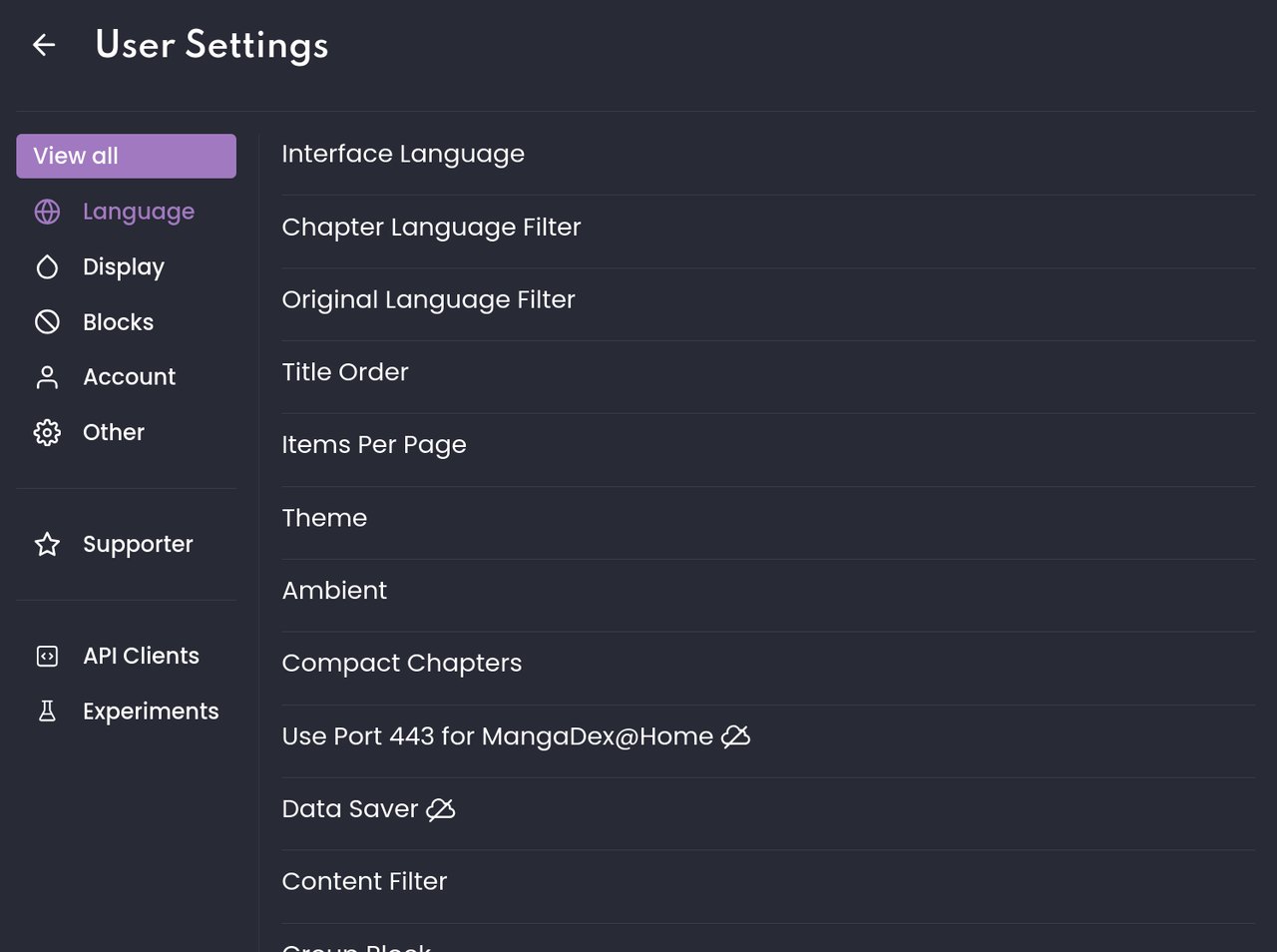
image.png


I have no clue how to reproduce this issue.

This is on Linux, Zen browser (firefox)
 
The Oracle
Joined
Jan 24, 2018
Messages
486
Can't reproduce by simply going into settings.
Is it still happening, did you try refreshing the page to see if that fixes it?

Can you provide the specific distro, version, and linux kernel? Someone else might be able to deduce the issue.
 
Joined
May 14, 2026
Messages
8
I tried using a different browser (firefox) and the options are loading, so its either an issue with zen browser, or i have a persistent browser setting thats causing the issue (even if i have no idea where that could have come from)
 
Joined
May 14, 2026
Messages
8
i have a conjecture as to what could be causing this issue. i just remembered that right before it stopped working, i deleted some of my mdLists, and since i had two tabs open, i deleted the same lists multiple times (because it didnt look like they were dissapearing). and along with the settings, the mdList options (like adding a new list) also dont show up.
 
The Oracle
Joined
Jan 24, 2018
Messages
486
i have a conjecture as to what could be causing this issue. i just remembered that right before it stopped working, i deleted some of my mdLists, and since i had two tabs open, i deleted the same lists multiple times (because it didnt look like they were dissapearing). and along with the settings, the mdList options (like adding a new list) also dont show up.
Have you tried clearing MD cookies and cache in the Zen browser? See if some stuff still remain after wiping, that for some reason affects incognito. If it doesn't report 0KB in use after a complete wipe, then those will need manual deletion by going directly to the folder(s) where they're stored.
 
Joined
May 14, 2026
Messages
8
ok, im so sorry. it was uBlock... i didnt think it would be, since i had it even when the settings were working. but i should have tested it anyways -_-
 
The Oracle
Joined
Jan 24, 2018
Messages
486
i meant in the mangadex settings, reset settings.
Those setting shouldn't matter, those aren't stored locally. If it'll work with a different profile then that means extension conflict, or corrupt cache.

ok, im so sorry. it was uBlock... i didnt think it would be, since i had it even when the settings were working. but i should have tested it anyways -_-
Just uBlock, not uBO? Odd that it suddenly just broke on you though. I'm guessing if it was fine even with the extension running before, then one of your filters must've updated which caused it or something.
 
Joined
May 14, 2026
Messages
8
it is origin, i just didnt type it all out. and that is what i was thinking as well, that a filter updated. should i add [solved] to the thread title?
 
The Oracle
Joined
Jan 24, 2018
Messages
486
it is origin, i just didnt type it all out. and that is what i was thinking as well, that a filter updated. should i add [solved] to the thread title?
Yeah, if this was in the Support Forums instead. You've solved your own issue lol.
Have fun sussing out which of your filter's the culprit then, it's likely one of your custom added filters, check which one updated around the time it started breaking.
 
Joined
May 14, 2026
Messages
8
so i should have put this in the support fourms? or do you mean that i would add [solved] only if it was in that form? anyways, thanks alot for you help :)
 
The Oracle
Joined
Jan 24, 2018
Messages
486
so i should have put this in the support fourms? or do you mean that i would add [solved] only if it was in that form? anyways, thanks alot for you help :)
In hindsight, yes, but it's fine, it happens from time to time like this recent one. It'll probably be classified as [Not a bug] instead or something. Any one of the mods would take care of the cleanup.

You can add [Solved] in the title if you want, or wait until you confirm and determine which filter (and/or line) caused it. Someone might be able to give you an unbreak to add to your custom filter if you report it... or you can add [Solved] after confirmation and go to the uBO reddit to see if you can get an unbreak over there instead(recommended).
 
Last edited:

Users who are viewing this thread

Top